The first minute of class shouldn't be spent in a line.
Self-service check-in on a front-door kiosk, a live board that tells the front desk the truth, and waivers that get signed before class: on the kiosk, by QR code, or with a link sent to the member's phone.
3 sec
From walking in to checked in on the kiosk
0
Paper forms, clipboards, or binders
4 ways
To sign a waiver: kiosk QR, text, WhatsApp, or email
100%
Of arrivals counted, on every class
Kiosk self check-in
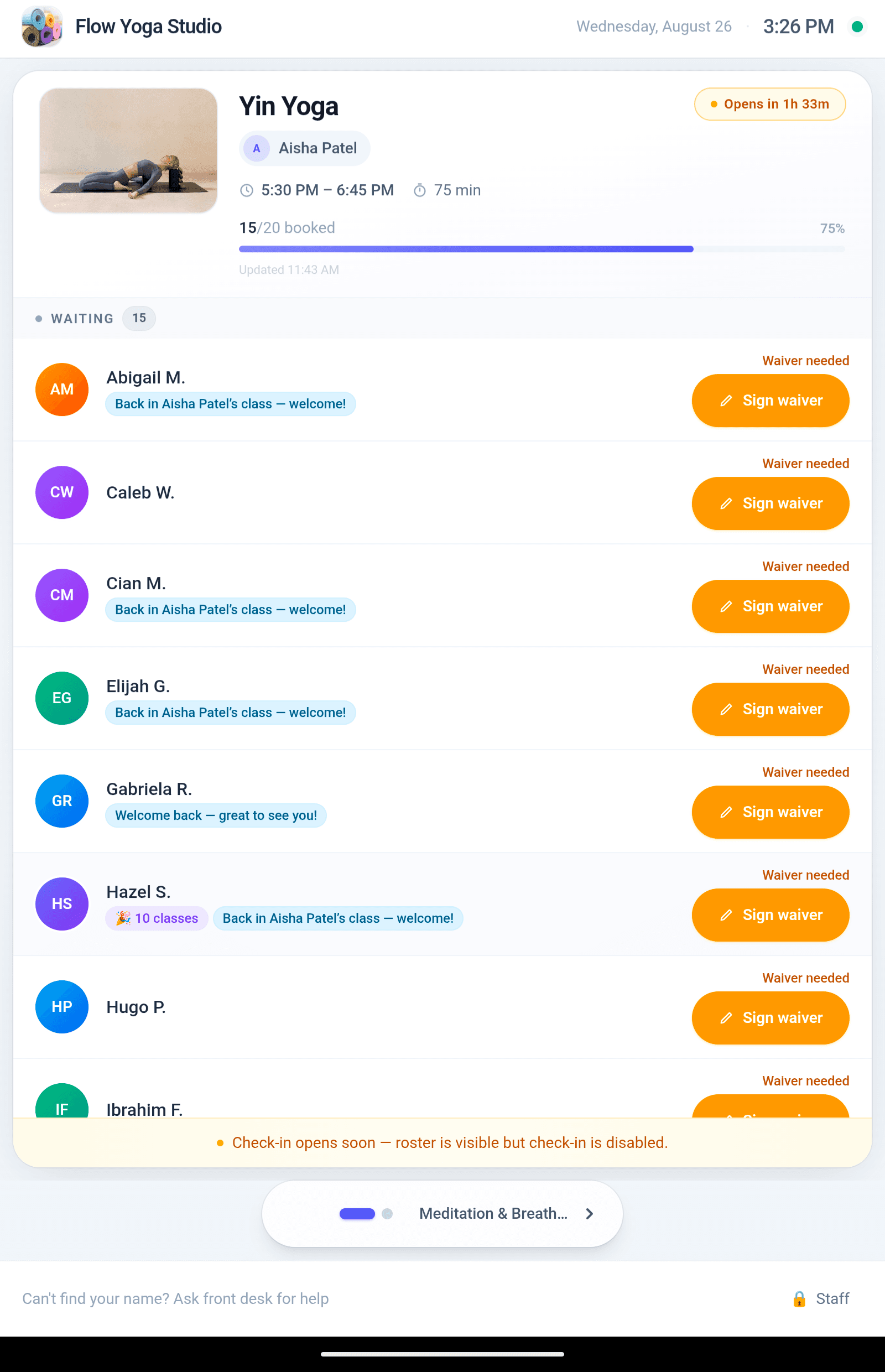
A tablet at the door, locked to check-in only. Members find their class, tap their name, and they are in. The roster updates live, capacity fills visibly, and check-in opens and closes itself around the schedule. Staff settings sit behind a PIN.
Optional recognition moments
Birthdays, class milestones, streaks, first visits, and welcome-backs can appear on the kiosk as members arrive. Every cue is optional and off by default. Turn on only what fits your studio.
A front-desk board that tells the truth
Now and next classes with booked, checked-in, no-shows, and cancellations, counted from real bookings rather than stale counters. When a card says all in, everyone is in.
Waivers gate check-in
A member with an unsigned or expired waiver is flagged before they are on the mat. Choose enforcement: block check-in until signed, or warn and let staff decide. Your policy, applied consistently.
Sign anywhere, in seconds
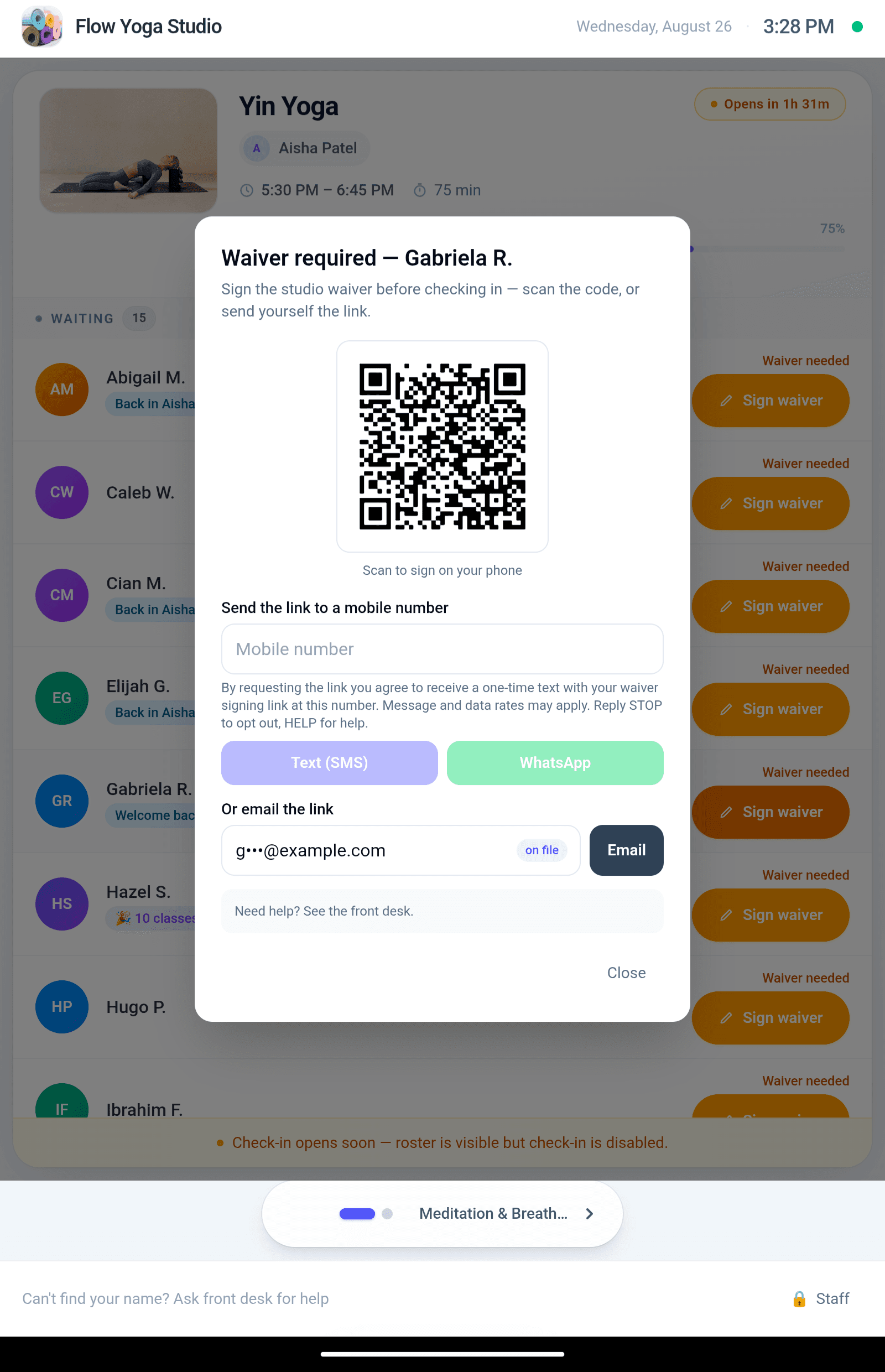
The kiosk shows a QR code so the member can sign on their own phone, or sends the signing link by text, WhatsApp, or email in one tap. Contact details stay masked on shared screens.
Insights on arrivals
Arrivals over time, busiest hours, check-in methods, show and no-show rates, and the waiver signing funnel, so you can see how the door is really running.
Front desks don't fail loudly. They leak.
A queue here, an uncounted arrival there, a no-show nobody follows up on. None of it looks like a crisis, and all of it costs members.
The desk without it
- A line at the desk while one person checks everyone in by hand
- No one really knows who came, because attendance lives in someone's head
- No-shows slip by unnoticed, so the same spots go to waste every week
- New members arrive to a clipboard and a pen
- Signed waivers live in a binder that nobody can search
The desk with Flowtropy
- Members check themselves in on a tablet in seconds
- Every arrival is counted the moment it happens, on every class
- The board shows booked, checked-in, and no-shows live, class by class
- Missing waivers are caught at the door and signed on the spot
- Every signed waiver is stored, searchable, and ready as proof
A roster members handle themselves.
The class, the teacher, live capacity, and every waiting member one tap from checked in. Anyone missing a waiver sees it before they are on the mat, not after. And if you want the kiosk to greet regulars or celebrate a milestone, those recognition cues are there to switch on, entirely your call.
- Check-in opens and closes itself around the class schedule
- “Waiver needed” is impossible to miss, and one tap to fix
- Optional recognition cues, off by default, you choose what shows
Signed before the first breath.
No clipboard, no “we'll get it next time.” The member scans a QR code and signs on their own phone, or the kiosk sends the link by text, WhatsApp, or email in one tap. The moment the signature lands, the gate clears, and the studio holds a timestamped record of who signed, what they signed, and how.
- One canonical signing link, the same flow from kiosk, email, or front desk
- Consent language and opt-out built into every send
- Contact details on file stay masked on the shared screen
An unsigned waiver isn't paperwork. It's uninsured risk.
Waivers only matter on the worst day, and on that day “we usually have people sign something” is not a defence. Here is what quietly goes wrong with paper and PDFs sent by email, and how Flowtropy closes each gap.
One injury, zero signatures
A member gets hurt in class and there is no signed liability waiver on file. That is not an admin gap. It is the business's personal exposure, and insurers ask for the waiver first.
Expired without anyone noticing
Waivers age out. A signature from three years ago may not cover today's classes, and nobody re-checks a paper folder. Expiry windows and re-sign reminders are automatic here.
The wording changed; the signatures didn't
Legal updated the waiver last year, but half the base signed the old version. Version tracking knows exactly who signed what, and asks for a new signature only when legal content actually changes.
Minors on the mat
Kids in class need guardian signatures, with the guardian relationship recorded. Guardian flows and per-minor coverage are built into the signing experience.
Paper gets lost
A binder at the desk is one spilled coffee away from being evidence for nobody. Every signature here is a stored, hash-verified PDF, findable in seconds, years later.
"Prove they agreed."
A typed name alone convinces no one. Each signature records electronic consent, intent to sign, the exact text agreed to, IP address, device, and time spent reading.
Managing the forms is the easy part.
Author waivers in rich text or upload a PDF. Add initials points, guardian signatures, and custom form fields. Set who must sign what, for all classes or specific ones. Choose expiry windows and let reminders chase renewals. Track versions so a legal change asks for a new signature and a cosmetic edit does not. Export everything, any time.
How it works
Turn on check-in and publish your waiver
Enable the kiosk, set the staff PIN, and pick your arrival window. Author your waiver once, as rich text or a PDF, with initials points, minor coverage, and an expiry policy.
Members arrive and tap their name
Anyone missing a waiver sees exactly one path: sign it, right there on the kiosk or on their own phone.
The desk watches the board, not the door
Live counts per class. No-shows are visible the moment check-in closes. Corrections such as mark-attended and undo are one click, with a full audit trail.
Insights close the loop
Weekly patterns, capacity headroom, and waiver completion, plus reminders that chase unsigned links so your staff never has to.